
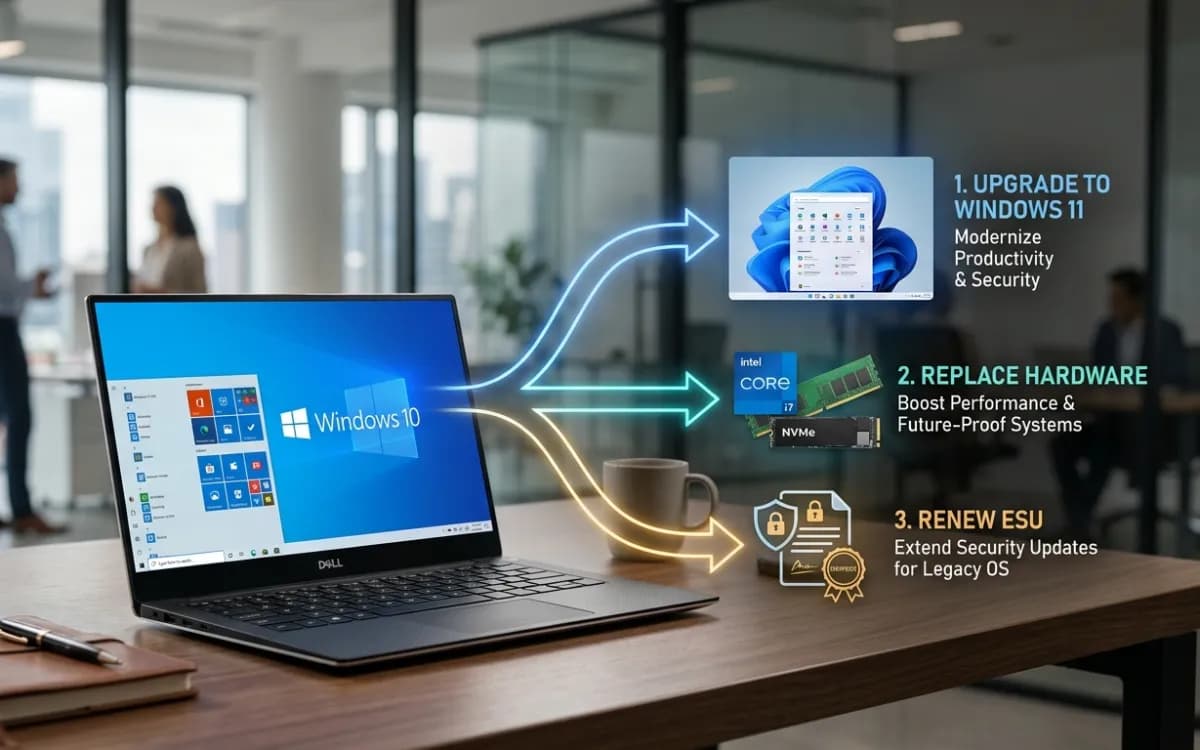
On October 13, 2026 — the October Patch Tuesday — the first year of Windows 10 Extended Security Updates ends; on October 14, Year 2 begins, and Microsoft's ESU program page sets the commercial license at "$61 USD per device for Year One" and adds that "the price doubles every consecutive year, for a maximum of three years." Applied, that makes Year 2 $122 per device and Year 3 $244. For a mixed fleet — some machines Windows 11-capable, others stuck on aging silicon, others already covered through cloud entitlements — blanket renewal wastes money and blanket refusal leaves gaps. What each seat actually needs is a per-device decision grounded in cost, hardware age, application readiness and exit date.
This article provides a decision model. Not a recommendation to pay, not a recommendation to skip. A framework to separate the three populations in your estate and act before the Year 1 window closes on October 13, 2026.
What Year 2 actually costs
Microsoft priced commercial ESU at $61 per device for the first year, and the price doubles each year for a maximum of three years. Year 2 runs from October 14, 2026 through October 12, 2027 at $122 per device. Year 3, if you went that far, would be $244 per device. Organizations that wait until Year 2 cannot simply purchase Year 2 coverage. They must also purchase Year 1 coverage retroactively. A business that skipped Year 1 and now wants coverage is not looking at $122 per device. It is looking at $183 — $61 for a year of protection that has already elapsed, plus $122 for the year ahead.
A fleet of 2,000 Windows 10 devices is $122,000 in Year 1, $244,000 in Year 2, and $488,000 in Year 3, and close to $854,000 over the full three years if you carry every device the whole way. That number is where migration starts to look cheaper than maintenance — but only when you compare it to the right alternative for each seat, not to a single fleet-wide average.
In Microsoft's own terms, ESU is cumulative. You cannot sit out a year to save money and rejoin later at the current rate. You also cannot buy a partial period — there is no six-month option. Any device entering coverage after October 13, 2026 pays for both Year 1 and Year 2.
The Intune / Autopatch discount
Not every device pays the full $122. Organizations using Microsoft Intune or Windows Autopatch can purchase the extended support with an "ESU cloud activation license" at a discounted $45 per device for Year 1. Devices managed by Intune or Autopatch pay $45 + $90 + $180 = $315 across three years, compared to $427 under the traditional activation key route. That discount is worth modeling against Intune licensing costs for organizations not already enrolled.
ESU included at zero additional cost
ESU is included at no additional charge for Windows 365, Azure Virtual Desktop, and certain other Azure services. These include Azure virtual machines, Azure Dedicated Host, Azure VMware Solution, Nutanix Cloud Clusters on Azure, Azure Local, Azure Stack Hub and Azure Stack Edge. Devices already covered by a qualifying cloud entitlement should never appear on the ESU purchase order.
Education pricing
ESU pricing for Microsoft education customers will be $1 per license for the first year, $2 the following year, and $4 the third year. At those numbers, the license cost is trivial; the real spend is administration and the migration work that ESU postpones.
What ESU does and does not deliver
The ESU program provides customers with a more secure option to continue using their Windows 10 PCs after October 14, 2025. The ESU program helps reduce the risk of malware and cybersecurity attacks by providing access to critical and important security updates as defined by the Microsoft Security Response Center (MSRC) for devices running Windows 10, version 22H2. ESU enrollment does not provide other types of fixes, feature improvements, or product enhancements. It also does not come with technical support. ESU is intended as a temporary solution and does not include new features, non-security updates, design change requests or technical support.
That is a sharp boundary. ESU keeps the OS patchable against known CVEs. It does not keep application stacks fully supported, resolve driver gaps, add hardware enablement or extend Microsoft 365 Apps into a fully supported configuration on Windows 10. Any seat being kept on Windows 10 purely for ESU still has an application-support liability that ESU does not address.
The consumer ESU extension does not change the commercial calculus
Microsoft has quietly extended its free Windows 10 Extended Security Updates (ESU) program for consumers by an additional year, allowing enrolled devices to continue receiving security updates until October 12, 2027. All Windows 10 users that are already enrolled in the ESU program will get this extended year of updates automatically. You can enroll in the program for free by signing in with a Microsoft account, or pay for access via 1,000 Microsoft reward points or $30 USD.
That extension applies to personal-use devices — Windows 10 22H2 Home, Professional, Pro Education, and Workstations editions enrolled under the consumer path. The commercial ESU program remains a separate, per-device paid offering through Volume Licensing or CSP. Do not mix consumer enrollment paths into a commercial fleet plan.
Three populations, three default actions
Every managed Windows 10 device falls into one of three groups. Identify which group each seat belongs to, then validate exceptions.
Population A: Upgrade to Windows 11
Default action: In-place upgrade or wipe-and-load to Windows 11.
This group contains every device that meets Windows 11 requirements and has no verified application, driver or policy blocker. Windows 11 requires a 1 GHz or faster processor with two or more cores on a compatible 64-bit processor, 4 GB of RAM or greater, and 64 GB or greater available disk space. System firmware must be UEFI and Secure Boot capable, and the device needs Trusted Platform Module (TPM) version 2.0. On Windows 11 24H2 and higher, the system also requires CPU instruction support for SSE4.2 and the POPCNT instruction.
CPUs with TPM 2.0 support — Intel's 8th Gen (Coffee Lake) and AMD's Ryzen 2000 (Zen+) processors or later — can easily update to Windows 11. Virtually all PCs manufactured after 2018 include a TPM 2.0. It is sometimes disabled by default in the BIOS/UEFI.
Spending $122 per device on ESU for a machine that can run Windows 11 today is a pure waste — the migration work still has to happen, and the license fee buys nothing but delay.
Population B: Replace the hardware
Default action: Procure a Windows 11 device and retire the old unit.
Devices with pre-2018 processors, missing TPM 2.0 hardware, or structural reliability problems (out-of-warranty, high repair incident rate, failing batteries) belong here. The cumulative three-year ESU price at list rate is $427 per device. In many markets, a refurbished or entry-level Windows 11 workstation costs less.
The replacement comparison is not "new PC sticker price" versus "$122 ESU license." It is:
Cost Category | Option A: Modernize & Replace | Option B: Hold & Extend (Status Quo) |
Direct Investment | New Hardware + Extended Warranty | Year 2 Windows ESU Licensing |
Deployment & Admin | Device Provisioning & Configuration | Ongoing Legacy Administration & Patching |
Application Readiness | Application Migration (Immediate) | Migration Cost (Deferred to Year 3) |
Risk & Productivity | Scheduled User Transition Downtime | Unplanned Failure Risk & Expected Repairs |
Cost Offsets | Less: Residual Asset / Trade-In Value | None ($0.00) |
Net Financial Impact | Total Replacement TCO | Total Hold & Delay Cost |
If a device cannot run Windows 11 and has no specialist dependency tying you to that exact chassis, the ESU license just delays a purchase you will make anyway, at a higher total cost.
Population C: Renew ESU with a documented exit plan
Default action: Purchase Year 2, assign an owner, set a migration or replacement date before October 12, 2027.
This is the smallest group by intent. It contains devices where a verified blocker — a certified industrial application, a hardware-dependent peripheral, a regulatory validation cycle — prevents migration within the Year 1 window. These devices must have:
A named blocker with evidence (vendor statement, test failure log, compliance filing).
A business owner accountable for resolution.
A target exit date before Year 2 expires.
Confirmed endpoint security coverage for another year on Windows 10.
Without all four, the device is not a legitimate ESU candidate; it is a deferred decision.
The per-seat decision tree
The node marked in red — "Buy ESU Year 2 + set exit date" — is the only path that should produce a purchase order. Every other path either removes the device from the ESU scope or replaces it.
Running the math: a worked 500-seat example
Assume a mixed estate of 500 Windows 10 devices inventoried in September 2026. After hardware audit and application testing, the fleet splits as follows:
Compare that ~$9,570 ESU bill for 85 seats against the $61,000 it would cost to renew the entire 500-seat estate at list price. The decision model does not "save" $51,000 — it prevents spending $51,000 on licenses that do not solve the underlying problem for 415 devices that can migrate or must be replaced.
The 85 ESU seats still carry their own costs beyond the license: deployment and activation, patch validation, monitoring for application-support gaps, and the migration or replacement project that runs during the coverage window.
Building your inventory before the Year 1 deadline
You need three data sets reconciled into one view per device before October 13, 2026.
1. Hardware readiness
Pull the processor model, TPM version and firmware mode for every endpoint. In Microsoft Intune, the Windows 11 readiness report classifies each device. Without Intune, run PowerShell or WMI queries across the fleet, checking Get-Tpm, Confirm-SecureBootUEFI and CPU model against Microsoft's published Windows 11 compatible processor list.
2. Application and driver compatibility
The upgrade blocker is rarely Windows 11 itself. It is the line-of-business application, the custom driver or the vendor certification that has not been validated against a newer OS. Collect vendor support statements for every application in the critical stack. A vague "we haven't tested it" is an action item, not a permanent block.
3. Current ESU and entitlement status
Confirm which devices already hold a Year 1 ESU key, which are covered through Windows 365 or Azure Virtual Desktop, and which are running LTSC editions with separate lifecycle dates. The Windows 10 Enterprise LTSC 2021 edition (version 21H2) does not have extended support from the standard ESU program. It will reach end of servicing on January 12, 2027. ESU coverage for Windows 10 Enterprise LTSC 2021 will be available for purchase starting September 1, 2026. That is a different product, different timeline and different license — do not merge it into the 22H2 ESU count.
LTSC and IoT LTSC: separate lifecycle, separate decision
Microsoft's LTSC 2021 ESU offer is not for Windows 10 IoT Enterprise LTSC. IoT Enterprise LTSC devices remain in support through January 13, 2032. Mixing these into the same renewal spreadsheet either inflates your ESU count or causes a supported device to be unnecessarily replaced.
Map each LTSC variant against its published end-of-servicing date before folding it into any migration plan.
When ESU is a defensible spend
ESU Year 2 earns its cost in a narrow set of situations:
Certified application dependencies. A medical-device interface validated only against Windows 10, where revalidation takes six or more months and cannot be compressed.
Vendor-locked hardware. Industrial control PCs where the equipment manufacturer has not certified a Windows 11 driver and the alternative is taking production equipment offline.
Regulatory hold. A compliance audit cycle that prevents OS changes during a defined freeze window, with a documented lift date inside Year 2 coverage.
Site closure or consolidation. A branch closing in Q1 2027 where replacement hardware is waste.
In every case, the ESU purchase should come with an expiration date, not just a renewal date.
When ESU is a tax on indecision
If none of the above apply, ESU Year 2 is a holding cost for a migration that should have started in Year 1. Common warning signs:
The "blocker" is "we haven't tested yet" with no test scheduled.
The application vendor confirmed Windows 11 support months ago but nobody scheduled the deployment.
The device is Windows 11-capable but was excluded because the team defaulted to ESU across the board.
The renewal is treated as an IT budget line rather than a project with an owner and exit milestone.
A device with no blocker, no owner and no exit date does not need ESU — it needs a decision.
What to watch for during Year 2
Third-party application support. Security vendors, browser makers and major productivity suites set their own Windows 10 end-of-support dates independently of Microsoft. An ESU patch for the OS is worth less if the endpoint protection agent stops receiving updates.
Compliance frameworks. The UK Cyber Essentials scheme considers Windows 10 devices not enrolled in the ESU program to be unsupported and non-compliant. Other frameworks may follow. Check whether your regulatory environment treats ESU coverage as equivalent to full OS support or as a concession with conditions.
Year 3 exposure. Year 3 doubles again to $244 per device, and cumulative entry rises to $427. Any Year 2 seat that does not exit during the coverage period becomes a Year 3 budget exposure. Build reporting that tracks ESU seat count monthly and flags unresolved blockers before the next renewal window.
Questions estate managers ask about Year 2
Can a device skip Year 1 ESU and go straight to Year 2?
No. ESU is sold as consecutive coverage, so if you skipped Year 1 and decide to enroll in Year 2, you pay for both. A device that comes into the program in Year 3 costs $427, not $244. There is no late entry at the current year's price. The doubling and cumulative rules are designed to push migration, not to reward delayed purchasing.
Does the free consumer ESU extension cover business PCs?
No. The Microsoft announcement concerns the Windows 10 ESU program for personal use devices, which has been extended through October 12, 2027. The commercial ESU program is a separate paid offering sold through Volume Licensing or CSP. Consumer enrollment is not a licensing shortcut for domain-joined or Intune-managed devices.
Is the Intune discount worth the Intune licensing cost?
It depends on the size of the ESU population and whether the organization already holds Microsoft 365 licenses that include Intune. The discount is approximately 25%, costing $45 USD per device for Year 1 under cloud-managed activation. Over three years, that totals $315 versus $427 per device under traditional activation. The $112-per-device saving across three years is meaningful at fleet scale, but only after accounting for the per-user Intune license cost for devices not already enrolled.
What if my Windows 10 LTSC 2021 devices reach end of servicing during Year 2?
For Windows 10 Enterprise LTSC 2021, ESU coverage can run through January 8, 2030. Extended Security Updates for Windows 10 Enterprise LTSC 2021 will be available for purchase starting September 1, 2026. You can get them through Volume Licensing or a Microsoft Cloud Solution Provider. Track these devices under their own lifecycle; they are not part of the standard Windows 10 22H2 ESU program.
The decision that matters is not Year 2 — it's the exit
Year 2 ESU is not the risk. The risk is arriving at October 2027 with the same device population, the same unresolved blockers and a Year 3 price of $244 per device. Every seat that enters Year 2 without a funded migration project is a Year 3 liability.
Start the inventory now. Run the hardware readiness check. Collect vendor support statements. Match each device to a population: upgrade, replace or hold. And for the seats that stay, put a name, a budget line and a date on the exit plan before you approve the purchase order.


Discussion
Loading discussion…