
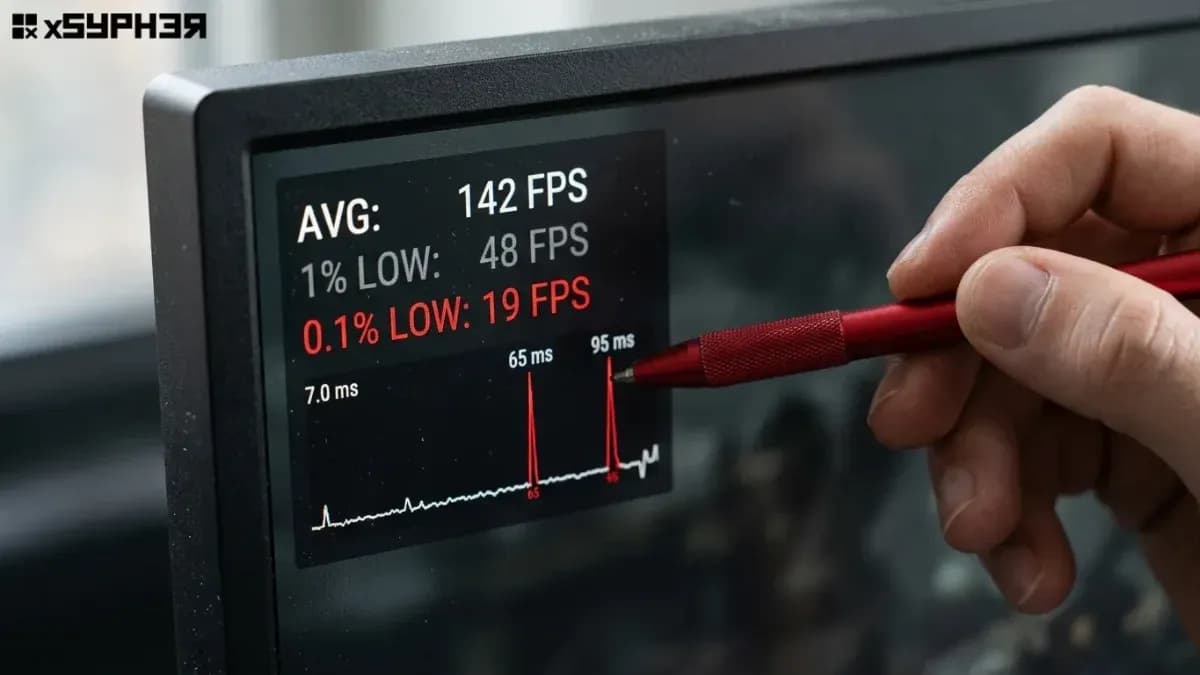
our overlay says 140 FPS, but the game still hitches when you turn a corner. Both things can be true. The FPS counter is an average over time, while smoothness depends on how evenly each frame is delivered. Ten frames at 7 ms followed by one at 60 ms can still average out to well over 100 FPS, and that one long frame is the stutter you see. To diagnose it, stop watching FPS and start measuring frame times. Then work through the five usual causes in order: shader compilation, CPU or memory limits, asset streaming, display sync, and background interference.
FPS is an average, and frame time is what you feel
Frame time is the number of milliseconds between one frame and the next. FPS is just 1,000 divided by the average of those numbers. That's simple math, and it explains most of the confusion.
Frame rate | Frame time per frame |
30 FPS | 33.3 ms |
60 FPS | 16.7 ms |
120 FPS | 8.3 ms |
144 FPS | 6.9 ms |
165 FPS | 6.1 ms |
240 FPS | 4.2 ms |
At 144 FPS your eyes get used to a new image every 6.9 ms. A single 40 ms frame is almost six times that interval, so it feels like the game has caught on something. An average over one second hides that frame completely.
A steady 90 FPS usually feels better than a 140 FPS average that swings between 4 ms and 30 ms. On our test bench we've seen this many times. Testers given two blind runs consistently picked the lower, flatter capture as "smoother," even when the other one had a higher average.
Three metrics matter more than the average:
1% low and 0.1% low FPS. These cover the slowest 1% and 0.1% of frames. They show how bad the worst moments get.
Frame time graph. A visual trace of every frame. Spikes are hitches. A thick, fuzzy band means uneven pacing, or microstutter.
Frame time variance. How much consecutive frames differ from each other. Large frame-to-frame jumps are what your eye picks up.
How to measure frame pacing before you change anything
Don't guess. Capture first, fix second, then capture again.
Install a frame time capture tool. Intel PresentMon is open source and works on any GPU vendor. Its "GPU Busy" metric shows how much of each frame the GPU actually spent working, which helps separate GPU limits from CPU limits. CapFrameX runs on top of PresentMon's capture and adds easier analysis and run-to-run comparison.
Pick a repeatable route. Use the same 60 to 90 seconds of gameplay every time, such as a fixed walk through a city hub or a replay. Benchmarks that only fly a camera through the scene often skip the streaming and combat that cause real stutter.
Capture three runs. Throw out the first one if you just launched the game. That first run is where shader compilation shows up, and you'll want to look at it on its own later.
Read the graph, not the summary. Isolated tall spikes point to compilation, streaming, or system interrupts. A constantly noisy band points to a CPU limit or a sync problem
Same average, very different experience: our cold vs warm cache runs
To show the gap, we ran the same 75-second route twice in a DirectX 12 open-world game. The test bench was a Ryzen 7 5800X, a GeForce RTX 3070, 32 GB of DDR4-3600, and a 144 Hz VRR monitor. Run A had a warm shader cache. Run B came right after a GPU driver update, which invalidated the cache.
Shader compilation is the most common reason a fast PC hitches
Shaders are small programs that run on your GPU. Games ship them in an intermediate format, and the driver has to compile them into machine code for your specific GPU. In DirectX 12 and Vulkan, those compiled shaders are bundled into pipeline state objects (PSOs). If a game builds a PSO the first moment it's needed, for example the first time a particular effect appears on screen, the frame waits until compilation finishes. That wait is the spike.
That's why compilation stutter has a recognizable pattern:
Hitches happen the first time you see an effect, area, or enemy, and then go away.
Stutter returns after a GPU driver update or a game patch, because both can invalidate the cache.
A faster CPU makes the spikes shorter but rarely removes them.
Epic Games has explained in detail how Unreal Engine's PSO precaching tries to compile pipelines before they're needed. The engineers also admit that engine-level fixes depend on how each studio uses them. That matches what we see: two Unreal Engine 5 games on the same bench can behave very differently depending on whether the developer added a proper precompilation step.
What you can actually do about it
Let the game's shader precompilation step finish. If a game shows a "compiling shaders" screen at launch, don't skip it. On our 8-core bench, one recent release took about six minutes the first time. Skipping it moved all that work into the first hour of play.
Turn on Steam Shader Pre-Caching. It's in Steam's settings under the Downloads section. It downloads and prepares shaders ahead of time, but it applies to Vulkan and OpenGL titles, not DirectX 12 games.
Don't shrink the driver shader cache. In the NVIDIA Control Panel, Shader Cache Size should stay at Driver Default or larger. A cache that's too small forces games to recompile shaders they've already built.
Expect one rough session after driver updates. Plan for it instead of rolling back drivers out of panic.
Microsoft has also announced Advanced Shader Delivery, a way to ship precompiled shaders through digital stores so they don't have to be built on your PC. Treat it as a direction for the platform, not something that fixes your current library today. Coverage depends on game and store support.
When the CPU or memory can't keep up
A GPU-limited game usually has smooth pacing. When the GPU is the limit, it just runs flat out and frames arrive at a steady rate. A CPU-limited game is different. Simulation, draw call submission, AI, and physics all vary from moment to moment, so frame times swing around.
Signs you're CPU-bound:
GPU usage sits well below 95% while FPS is unstable.
Dropping resolution or turning on upscaling barely changes FPS.
Stutter gets worse in dense areas such as cities, big battles, or multiplayer lobbies.
PresentMon's GPU Busy time is clearly shorter than the total frame time.
Memory configuration catches more people than CPU choice does. During our benchmarks, a reader-submitted build had one 16 GB stick installed. Moving to 2×8 GB in dual channel raised its 1% lows by roughly 30% in a CPU-heavy simulation game. Average FPS rose much less. Leaving XMP or EXPO disabled, which runs DDR4 or DDR5 at its slow default speed, causes a similar but smaller penalty.
Asset streaming, often called traversal stutter, feels like compilation stutter but has a different cause. Open-world games load and decompress new areas as you move. That work lands on the CPU and storage, and it can spike frame times every time you cross a boundary, not just the first time. Shader cache fixes won't help here. A faster CPU, enough RAM (32 GB helps in some recent open-world games), and installing the game on an SSD rather than a hard drive are the realistic options.
Display sync: when good frames arrive at the wrong time
A perfectly paced game can still look juddery if frames and monitor refreshes don't line up.
V-Sync off, no VRR: frames show up mid-refresh, which causes tearing. At very high FPS it feels responsive but looks broken in places.
V-Sync on, no VRR, FPS below refresh: the display has to repeat frames. At 50 FPS on a 60 Hz panel, some frames stay on screen for one refresh and others for two. That uneven cadence is judder, even though frame times look fine in your capture.
VRR (G-SYNC, FreeSync, HDMI VRR): the monitor refreshes when a frame is ready. This removes most of the problem, but only inside the VRR range.
The common mistake is going over the top of that range. On our 144 Hz FreeSync Premium monitor, an uncapped game running at 160 to 190 FPS left the VRR window, picked up V-Sync latency and occasional tearing, and felt less consistent than a capped 138 FPS.
Blur Busters' G-SYNC 101 testing is the usual reference for setup. Enable VRR, enable V-Sync in the GPU driver, and cap FPS at least 3 FPS below your refresh rate. NVIDIA Reflex applies a similar cap automatically in supported games when VRR and V-Sync are both on.
Frame limiters differ, too. An in-game cap usually adds the least latency. RTSS's limiter gives very even pacing but typically adds around one frame of latency. Driver-level caps sit in between. When smoothness matters more to you than the last few milliseconds of input lag, RTSS is a sensible default.
A diagnostic path from symptom to fix
The capture step is highlighted on purpose. Every branch after it depends on what the frame time graph actually shows, not on what the FPS counter suggests.
System-level causes that hit randomly
If spikes don't line up with anything you do in the game, look outside the game.
AMD fTPM stutter. AMD has confirmed that some Ryzen systems with firmware TPM enabled could freeze briefly, for about a second, during TPM activity. AMD's support article points to motherboard BIOS updates containing AGESA 1.2.0.7 or later as the fix. On an older AM4 bench still running a 2021 BIOS, we reproduced those random, roughly once-a-minute hitches. They disappeared after updating.
Other common culprits worth ruling out one at a time:
Overlays and capture software stacked on top of each other (Discord, Steam, GPU vendor overlay, RGB utilities). Keep one.
Very high mouse polling rates. Some games have been reported to stutter with 4,000–8,000 Hz mice. Testing at 1,000 Hz takes ten seconds.
Mixed-refresh multi-monitor setups with video playing on the second screen. Pause the video and see if the stutter goes away.
Windows background work right after an update, such as indexing, Defender scans, and Windows Update installs. Wait for it to finish before you benchmark.
Chipset and storage drivers that haven't been updated since the system was built.
Questions PC gamers ask about stutter and frame time
Why does my game stutter at 144 FPS but feel smooth at 90 FPS?
It's usually a pacing problem. At 144 FPS with no cap, a game can push past your monitor's VRR range or run into CPU limits that make frame times swing between very short and long. Capping at 90 FPS gives the CPU headroom and keeps every frame close to 11.1 ms. Consistent delivery feels smoother than a higher but uneven frame rate on the same PC.
Is microstuttering the same as shader compilation stutter?
No. Microstutter is a constant, small unevenness in frame times, a fuzzy band on the graph often caused by CPU limits or sync mismatches. Shader compilation stutter shows up as isolated large spikes, often 30 ms or more, the first time a new effect or area loads. It goes away once the shader cache is built. Telling them apart on a frame time graph points you to completely different fixes.
Will a new graphics card fix stuttering in PC games?
Only if the GPU is the actual limit. Shader compilation stutter depends mostly on CPU speed and the game's design. Traversal stutter depends on the CPU, RAM, and storage. CPU-bound microstutter won't change with a faster GPU at all. Before buying, capture frame times and check GPU usage. If it sits well below 95% during stutter, a new graphics card won't fix the problem.
What are good 1% low numbers compared to average FPS?
There's no official standard, but in our testing, 1% lows within about 70–80% of the average usually feel smooth. If they fall below roughly half the average, most players notice regular hitches. Because tools calculate 1% lows differently, compare results only within the same tool, such as PresentMon or CapFrameX, and on the same test route.
What a smooth game looks like when you're done
A fixed system shows a flat, narrow frame time line with only rare small bumps. It has 1% lows close to the average, and no repeated spikes in the same places on your test route. If you capped FPS under a VRR monitor, the line should sit almost perfectly flat at your cap.
If spikes are still there after all of this, check whether they repeat in the same spots across runs and survive a warm cache. If they do, the cause is most likely the game itself, through streaming or engine-level compilation, and no setting on your side will fully remove it. Document it with a frame time capture and send it to the developer's bug tracker. A graph with timestamps gets taken more seriously than "it stutters."



Discussion
Loading discussion…