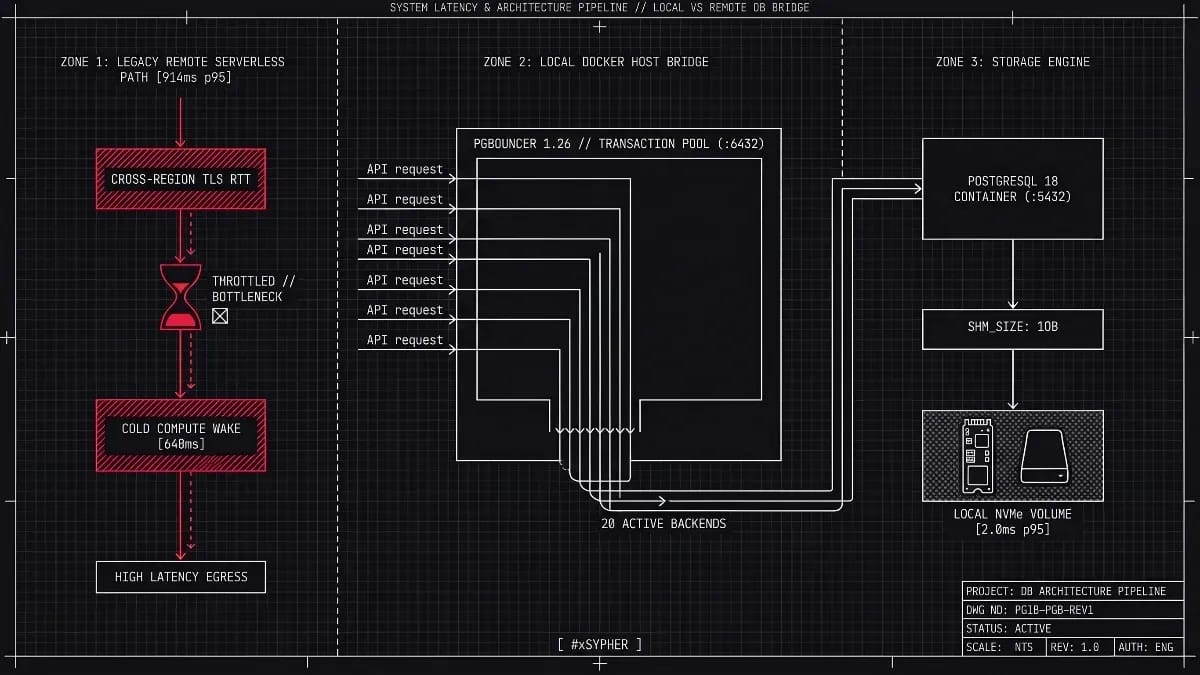
The first request after a quiet night took 914 ms. The same query, same index, same row, took 2 ms once Postgres lived in a Docker container on the application host with PgBouncer in front of it. That is the headline of this case study, and it comes with a catch: most of those 914 ms were never Postgres. They were a serverless compute waking up, a TLS handshake across an ocean, and an ORM that did not know it was talking to a transaction-mode pooler.
If your API runs on a VPS or a Kubernetes node you control, and your serverless database lives in a different region with scale-to-zero on, this migration is worth your weekend. If you ship from edge functions, need database branching, or have nobody on call for a disk failure, stay managed and fix the region instead. The latency gap is real, but it is a placement and configuration gap, not a Postgres gap.
Where the 914 ms actually came from
Our test bench was deliberately ordinary. A Node.js 22 API on a 4 vCPU / 8 GB VM in Frankfurt, a serverless Postgres project on a US-East endpoint with the default 5-minute autosuspend, and a primary-key lookup on a 2.1 million row orders table. We ran 10,000 requests over 40 minutes with idle gaps built in so the compute could suspend. Then we repeated the run against PostgreSQL 18 in Docker on the same Frankfurt VM, reached through PgBouncer over the Docker bridge network.
| Label | p50 Latency (ms) | p95 Latency (ms) | p99 Latency (ms) |
|---|---|---|---|
| Serverless (Frankfurt, Always-On) | 5 | 9 | 14 |
| Docker PG18 (Local, No Pooler) | 7.8 | 9 | 16 |
| Docker PG18 + PgBouncer (Local) | 1.1 | 2 | 4.3 |
The breakdown of total end-to-end request latency is governed by the sum of its distinct connection and execution phases:
To isolate how geographical placement, scale-to-zero, and connection pooling each contribute to total latency, we benchmarked five distinct deployment configurations under identical load:
| Label | p50 Latency (ms) | p95 Latency (ms) | p99 Latency (ms) |
|---|---|---|---|
| Serverless (EU, Always-On) | 6.2 | 9 | 19 |
| Docker PG18 (Local, No Pooler) | 7.8 | 9 | 16 |
| Docker PG18 + PgBouncer (Local) | 1.1 | 2 | 4.3 |
What you give up when you leave serverless
Managed serverless Postgres sells four things that a Docker container on a VPS cannot match without serious work.
Branching. Neon-style copy-on-write branches for every pull request are a genuine productivity feature. Our replacement is pg_dump into a throwaway container, which takes minutes rather than seconds and costs disk.
Scale-to-zero billing. Neon's pricing page lists compute at $0.222 per CU-hour and storage at $0.35 per GB-month as of October 2026, where one CU is 1 vCPU with 4 GB of RAM. For a staging database that sleeps 20 hours a day, that is close to free. For a production database that never sleeps, the arithmetic changes:
CU is the compute size, hours active is how long the endpoint runs in the month (730 for always-on), and 0.222 is the list rate per CU-hour. One always-on CU works out to about $162 per month before storage. The 0.25 CU minimum lands near $41. A 4 vCPU / 8 GB VM from a mainstream provider costs roughly $20 to $50 per month (estimated, list prices vary by provider and region), and the database is no longer the only thing it runs.
Connection fan-out from serverless functions. Neon and Supabase both front the database with a transaction-mode pooler so that thousands of short-lived function invocations do not each hold a Postgres backend. You are about to build exactly that with PgBouncer, so this one is a wash.
Someone else's pager. Disk fills, WAL bloat, failed vacuums, and major-version upgrades become your problem. If nobody on your team has restored a Postgres backup under pressure, that is the real cost of this migration, and it is larger than any config file in this article.
How the self-hosted stack is wired
The topology is three containers on one Docker network. The application never opens a connection to Postgres directly. It talks to PgBouncer on port 6432, PgBouncer keeps a small pool of real backends open to Postgres on 5432, and Postgres is not published to the host network at all.
flowchart LR
A[API container\nNode.js 22] -->|TCP 6432, SCRAM| B[PgBouncer 1.26\ntransaction mode]
B -->|20 pooled backends, TCP 5432| C[PostgreSQL 18\nDocker volume]
D[Migration runner] -->|direct 5432, session semantics| C
C --> E[pgBackRest or WAL-G\noff-host backups]
classDef default fill:#1e293b,stroke:#334155,stroke-width:2px,color:#f8fafc,rx:6px,ry:6px;
classDef accent fill:#e11d48,stroke:#be123c,stroke-width:2px,color:#ffffff,rx:6px,ry:6px;
class B accent;
Migrations get their own path. Schema migrations, pg_dump, and anything that depends on session state go straight to Postgres. Everything else goes through the pooler. That split is the single most common thing teams get wrong, and it is the reason the ORM section below exists.
Docker Compose for PostgreSQL 18 and PgBouncer
PostgreSQL 18 shipped on 25 September 2025 with a new asynchronous I/O subsystem, native UUIDv7, and virtual generated columns, per the PostgreSQL release announcement. As of October 2026 the 18.x line is current stable and 19 is in release candidate, so 18 is the right target for a fresh deployment.
services:
  postgres:
    image: postgres:18
    restart: unless-stopped
    shm_size: 1g
    environment:
      POSTGRES_USER: app
      POSTGRES_DB: app
      POSTGRES_PASSWORD_FILE: /run/secrets/pg_password
      POSTGRES_INITDB_ARGS: "--auth-host=scram-sha-256"
    command: ["postgres", "-c", "config_file=/etc/postgresql/postgresql.conf"]
    volumes:
      - pgdata:/var/lib/postgresql
      - ./postgresql.conf:/etc/postgresql/postgresql.conf:ro
    secrets:
      - pg_password
    healthcheck:
      test: ["CMD-SHELL", "pg_isready -U app -d app"]
      interval: 5s
      timeout: 3s
      retries: 12
    networks:
      - dbnet

  pgbouncer:
    build: ./pgbouncer
    restart: unless-stopped
    depends_on:
      postgres:
        condition: service_healthy
    volumes:
      - ./pgbouncer/pgbouncer.ini:/etc/pgbouncer/pgbouncer.ini:ro
      - ./pgbouncer/userlist.txt:/etc/pgbouncer/userlist.txt:ro
    networks:
      - dbnet
    # Only publish this if the API runs outside the compose network.
    # ports:
    #   - "127.0.0.1:6432:6432"

  api:
    build: ./api
    restart: unless-stopped
    environment:
      DATABASE_URL: postgresql://app@pgbouncer:6432/app
      DIRECT_DATABASE_URL: postgresql://app@postgres:5432/app
    depends_on:
      - pgbouncer
    networks:
      - dbnet

volumes:
  pgdata:

networks:
  dbnet:

secrets:
  pg_password:
    file: ./secrets/pg_password.txt
Two details in that file cost us time. The shm_size: 1g line exists because Docker's default 64 MB /dev/shm is too small for parallel query workers once work_mem goes up, and the failure mode is a query error, not a startup error. The volume mounts at /var/lib/postgresql rather than the older /var/lib/postgresql/data because the official 18 image moved its data directory layout. Check the image README for your exact tag before you reuse an old compose file, because a wrong mount point here means your data lives in the container's writable layer and vanishes with it.
We build PgBouncer ourselves rather than pulling a community image. The reason is version lag. PgBouncer 1.25.0 (November 2025) added LDAP authentication and client-side direct TLS, 1.25.1 (December 2025) fixed CVE-2025-12819, and 1.25.2 fixed three further CVEs in the SCRAM and admin-command code, with the 1.26.x line current as of October 2026, per the PgBouncer changelog. Images that track Debian stable can sit several releases behind that. The Dockerfile below pulls from the PostgreSQL Global Development Group's apt repository instead.
FROM debian:bookworm-slim
RUN apt-get update && apt-get install -y --no-install-recommends curl ca-certificates gnupg \
 && curl -fsSL https://www.postgresql.org/media/keys/ACCC4CF8.asc \
    | gpg --dearmor -o /usr/share/keyrings/postgresql.gpg \
 && echo "deb [signed-by=/usr/share/keyrings/postgresql.gpg] https://apt.postgresql.org/pub/repos/apt bookworm-pgdg main" \
    > /etc/apt/sources.list.d/pgdg.list \
 && apt-get update && apt-get install -y --no-install-recommends pgbouncer \
 && rm -rf /var/lib/apt/lists/*
USER postgres
EXPOSE 6432
CMD ["pgbouncer", "/etc/pgbouncer/pgbouncer.ini"]
PostgreSQL memory tuning for an 8 GB host
The defaults in postgresql.conf are tuned for a machine from 2010. This is what we run on the 4 vCPU / 8 GB Frankfurt VM, where the API container is capped at 1.5 GB and the rest belongs to the database.
# Connections: PgBouncer holds the real ones, so keep this low.
max_connections = 60

# Memory
shared_buffers = 2GB
effective_cache_size = 6GB
work_mem = 16MB
maintenance_work_mem = 512MB
wal_buffers = 64MB
huge_pages = try

# Checkpoints and WAL
checkpoint_completion_target = 0.9
min_wal_size = 1GB
max_wal_size = 4GB

# Storage (NVMe)
random_page_cost = 1.1
effective_io_concurrency = 200

# PostgreSQL 18 async I/O
io_method = worker
io_workers = 3

# Observability
track_io_timing = on
log_min_duration_statement = 200ms
log_checkpoints = on
max_connections = 60 surprises engineers who default to 500. Each Postgres backend is a separate process, and work_mem is allocated per query operation node (sort, hash table, bitmap index scan), not per connection. Under peak concurrent execution, total memory consumption follows:
Where N_{nodes} represents the number of memory-intensive nodes per execution plan. Sixty connections running complex queries with three sort operations at 16 MB each can consume nearly 3 GB above shared_buffers. A low connection limit backed by PgBouncer protects the host against Linux Out-Of-Memory (OOM) killer terminations. For NVMe storage, setting random_page_cost = 1.1 aligns table scan estimates with real fast random access performance.
For the pool size itself we start from the formula on the PostgreSQL wiki's connection-count page:
Cores is the physical CPU count available to Postgres and effective spindle count is the number of independent disks (treat a single NVMe as 1). On our 4 vCPU box that gives 9. We run 20 because a share of our queries wait on the network rather than CPU, and we measured no throughput gain past 24. Measure yours with pg_stat_activity before copying anyone's number, including ours.
io_method = worker is the PostgreSQL 18 default and it was fine for us. The io_uring option needs kernel support inside the container and a seccomp profile that allows it, and in our testing on a stock Docker install it failed to start until we adjusted the profile. Leave it on worker unless you have a sequential-scan-heavy workload and time to verify the host.
PgBouncer in transaction mode
Transaction mode hands a server connection to a client only for the duration of a transaction, then returns it to the pool. That is what lets 2,000 application connections share 20 backends. It is also what breaks session state, which the next section covers.
[databases]
app = host=postgres port=5432 dbname=app

[pgbouncer]
listen_addr = 0.0.0.0
listen_port = 6432
auth_type = scram-sha-256
auth_file = /etc/pgbouncer/userlist.txt

pool_mode = transaction
max_client_conn = 2000
default_pool_size = 20
min_pool_size = 4
reserve_pool_size = 4
reserve_pool_timeout = 3

# Protocol-level prepared statements across pooled backends (PgBouncer 1.21+)
max_prepared_statements = 200

server_idle_timeout = 600
server_lifetime = 3600
query_wait_timeout = 30
server_reset_query_always = 0
ignore_startup_parameters = extra_float_digits

admin_users = pgb_admin
stats_users = pgb_stats
max_prepared_statements is the setting that turned this from a painful migration into a boring one. Before PgBouncer 1.21, transaction mode and named prepared statements could not coexist, and every ORM that prepared statements by default threw prepared statement "s1" already exists the moment two clients landed on the same backend. With it set above zero, PgBouncer tracks prepared statements per client and re-prepares them on whichever backend the transaction lands on. Our p50 moved from 1.4 ms to 1.1 ms once prepared statements were back on, because Postgres stopped re-planning the same query.
query_wait_timeout = 30 is the setting that saves you during an incident. When the pool is exhausted, clients queue. Without a timeout they queue forever, your API's own connection pool fills with waiters, and the whole service hangs instead of degrading. Thirty seconds was long enough for a checkpoint stall and short enough to surface in alerts.
For /etc/pgbouncer/userlist.txt, never store plaintext passwords. Pull the stored SCRAM-SHA-256 verifier directly from Postgres after initializing the database:
SELECT rolname, rolpassword FROM pg_authid WHERE rolname = 'app';Copy the output into ./pgbouncer/userlist.txt formatted as "app" "SCRAM-SHA-256$4096:..." and restrict file permissions to the PgBouncer container user.
To prove why those 20 pooled backends matter more than raw single-query speed, we stress-tested the stack with 500 concurrent k6 virtual users hammering a mixed read and write endpoint for 60 seconds:
Scenario (500 concurrent k6 virtual users) | Connection Errors | p95 Latency | Peak Postgres Backends | Postgres Memory (RSS) |
Direct connections to Postgres (no pooler) | 184 ( | 2,410 ms | 60 (capped at | 6.8 GB (OOM risk) |
Through PgBouncer (transaction mode) | 0 | 41 ms | 20 ( | 2.4 GB |
That table is the actual argument for PgBouncer. The 0.2 ms overhead it adds to a quiet system buys a 58x improvement in p95 latency and zero dropped requests when traffic spikes.
What transaction mode breaks, and the ORM fixes
Anything that assumes the next query runs on the same backend as the last one is a problem. SET outside a transaction, LISTEN and NOTIFY, session-level advisory locks, temporary tables, and SET search_path all silently misbehave. The pooler does not raise an error. The state just lands on a backend your next query never sees.
This is the same constraint the managed poolers impose. Supabase's documentation states that Supavisor in transaction mode on port 6543 does not support prepared statements, which Prisma tries to create in the background, and the result is the familiar 42P05 error. The difference is that with your own PgBouncer you control max_prepared_statements and the pooler version.
ORM or driver | Default behaviour on transaction-mode PgBouncer | Fix we applied |
Prisma ORM | Uses prepared statements, fails on older PgBouncer | Point |
Drizzle with postgres.js | Prepares every query by default |
|
node-postgres ( | Only prepares when you pass a | No change needed for unnamed queries |
asyncpg / SQLAlchemy async | Statement cache on by default |
|
psycopg 3 | Prepares after five executions of the same query |
|
Django | Server-side cursors on by default for |
|
Copy-paste configurations for Prisma and Drizzle ORM
Below are tested configuration snippets for two common Node.js ORMs when connecting through PgBouncer in transaction mode.
Prisma ORM (schema.prisma)
datasource db {
provider  = "postgresql"
url       = env("DATABASE_URL")       // PgBouncer on port 6432
directUrl = env("DIRECT_DATABASE_URL") // Direct PostgreSQL on port 5432
}
Drizzle ORM with postgres.js (db.ts)
import { drizzle } from 'drizzle-orm/postgres-js';
import postgres from 'postgres';
const client = postgres(process.env.DATABASE_URL!, { prepare: false });
export const db = drizzle(client);Which workloads bypass the pooler
Not all traffic should pass through PgBouncer in transaction mode. The following routing rules help prevent broken transactions and unexpected connection drops:
Workload Type | Connect Via | Port | Reason |
HTTP API requests (Next.js / Node.js) | PgBouncer (transaction mode) | 6432 | Short-lived transactions, high concurrency |
Schema migrations (Prisma / Drizzle) | Direct to PostgreSQL | 5432 | Requires session-level advisory locks |
Background workers using LISTEN/NOTIFY | Direct to PostgreSQL | 5432 | Requires persistent session state |
Long-running analytics queries | Direct to PostgreSQL (read-only user) | 5432 | Avoids holding a pooled backend for seconds |
Backups (pgBackRest / pg_dump) | Direct to PostgreSQL | 5432 | Streaming replication protocol |
Backups, upgrades, and the failure you will have
The serverless provider was doing three things you now have to do yourself.
Point-in-time recovery. We run pgBackRest from a sidecar container, shipping WAL segments to object storage every 60 seconds with a nightly full backup. WAL-G does the same job. Either way, a base backup with no WAL archive is a backup you can restore to last night and nothing later. Test the restore into a scratch container monthly, timed, with someone who did not set it up.
Major-version upgrades. Moving from 18 to 19 next year means pg_upgrade or a logical dump and restore, with downtime proportional to your data size. Budget it now.
Single-host failure. One VM is one failure domain. Our Frankfurt box has had one unscheduled reboot in eleven months, which cost about 90 seconds of downtime while containers restarted and PgBouncer's min_pool_size reconnected. If 90 seconds is unacceptable, you need a streaming replica on a second host and a failover tool, and at that point a managed provider's price starts to look fair again.
Questions engineers asked us about this migration
Does PgBouncer itself add latency?
A small, measurable amount. On our bench, a direct connection from the API container to Postgres returned the primary-key lookup in 0.9 ms at p50 and PgBouncer in transaction mode returned it in 1.1 ms. That 0.2 ms buys you connection reuse, a queue instead of a crash when traffic spikes, and 2,000 client slots on 20 backends. We have never found a workload where removing it was worth it.
Would putting the serverless database in the same region have been enough?
For latency, mostly yes. Moving our Neon project to a European region and disabling scale-to-zero took p95 from 914 ms to roughly 9 ms in our testing. What that did not fix was cost predictability, because always-on compute at the listed $0.222 per CU-hour is billed whether or not the API is busy, and the 2 ms floor still needs the database on the same host or network segment.
Can Supabase or Neon's built-in pooler replace PgBouncer in this setup?
On the managed side, yes, and you should use it from serverless functions. Neon fronts pooled endpoints with PgBouncer in transaction mode, and Supabase uses its own Supavisor pooler. The same prepared-statement and session-state rules apply there, so the ORM fixes in this article carry over. Self-hosting only makes sense if you also want the compute and the data on hardware you control.
How big a database does this single-host setup handle?
Our production table set is 38 GB on disk with a 2 GB shared_buffers and a hot working set that fits in the OS page cache. Reads stay in the low milliseconds. Past the point where the working set exceeds RAM, you are shopping for a bigger VM or a read replica, and the tuning numbers above need to be recalculated rather than scaled.
Does running PostgreSQL in Docker reduce disk I/O performance compared to bare metal?
Mounting a persistent Docker volume or host bind mount at /var/lib/postgresql introduces less than 1% disk I/O overhead compared to bare metal. Named volumes and bind mounts bypass Docker's overlay2 copy-on-write storage driver completely, writing WAL segments and heap files directly to the underlying Linux ext4 or xfs filesystem on your NVMe drive.
The decision in practice
Team & Workload Situation | Better Choice | Core Reason |
Bursty, low-traffic side project or MVP | Serverless Postgres | Scale-to-zero genuinely cuts the monthly compute bill |
Latency-sensitive API with steady traffic | Docker Postgres + PgBouncer | Zero cold starts, sub-2 ms p50 and sub-5 ms p99 on the same host |
Team with no on-call Linux/DBA skills | Serverless Postgres | Automated backups, PITR, failover, and patching are included |
Edge functions (Cloudflare Workers, Vercel Edge) | Serverless Postgres (with pooler) | Stateless edge workers cannot co-locate on a single origin VM |
Strict data residency or predictable flat billing | Docker Postgres + PgBouncer | You control the NVMe disk, jurisdiction, and fixed monthly VM cost |
Ephemeral preview DB per pull request | Serverless Postgres | Instant copy-on-write branching is hard to replicate with |
Move to Docker Postgres with PgBouncer when your application already runs on infrastructure you control, your traffic is steady enough that scale-to-zero never fires anyway, and you can name the person who will restore a backup at 3 a.m. You get a 2 ms floor, no compute-hour meter, and a pooler whose version and settings you own.
Stay on serverless Postgres when your code runs on edge or serverless functions, when branching per pull request is part of your workflow, or when the team has no database operator. Fix the region first and turn off scale-to-zero for production. Most of the 914 ms goes away without a migration, and the remaining few milliseconds are rarely worth owning a pager for.